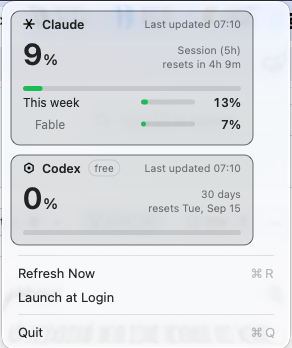
Headroom puts both providers' usage in your menu bar. One glance tells you
whether you can start something big — or whether you're ten minutes from a wall.
One card per provider. The big number is the window that runs out
soonest — everything else sits beneath it.
Colour that means something
Green below 75%, amber from 75%, red from 90%. The menu bar goes red at the same threshold, so you notice without opening anything.
Honest when it fails
Rate limited, offline, or a bad response — it says which. It never blames the network for a problem the network didn't cause.
Never blanks a good number
A hiccup keeps your last reading and dims it. You still see something true, marked as slightly old.
Survives token rotation
The CLIs rotate their tokens periodically. One failed poll is treated as a rotation window, not a sign-out.
Independent providers
Each has its own polling and backoff. Codex being rate limited can't disturb your Claude reading, or the other way round.
Silent
No notifications, no history, no cost accounting. It sits there and tells you one thing, accurately.
Your credentials
Read. Never written.
Headroom reads the tokens the CLIs already store on your machine. It
contains no code that writes, refreshes or deletes them — each CLI owns
and rotates its own.
No write path exists. Not for either credential file, on any platform.
The token goes one place — that provider's own endpoint, as a bearer credential. Never a log, an error, or disk.
Your identity isn't parsed. The Codex response carries an email and account ID; none of it is decoded at all.
Auditable. It's open source — the credential handling is a few dozen lines you can read in a sitting.
Claude Code · macOSlogin Keychain
Claude Code · Linux~/.claude/.credentials.json
Claude Code · Windows%USERPROFILE%\.claude\
ChatGPT Codex · all~/.codex/auth.json
A provider you aren't signed into is simply left out — not shown as an error.
Install
Build it in a minute
Swift 6 and a terminal. No installer, no account, nothing to sign up for.
# clone and build
git clone https://github.com/sunnixx/headroom.git
cd headroom
./Scripts/build-app.sh
open dist/Headroom.app
# tray dependencies, then build
sudo apt install libayatana-appindicator3-dev libgtk-3-dev
git clone https://github.com/sunnixx/headroom.git
cd headroom
./Scripts/build-linux.sh
# clone and build
git clone https://github.com/sunnixx/headroom.git
cd headroom
swift build -c release
Move Headroom.app to /Applications before enabling Launch at Login.
macOS asks for Keychain access on first run — the item belongs to the Claude Code CLI.
Works on KDE, XFCE, Cinnamon, MATE and Budgie. GNOME hides tray icons unless the
AppIndicator extension
is installed — that applies to every tray app, not just this one.
The notification area has no text beside an icon, so the percentage is drawn into the
icon itself. The tooltip names every signed-in provider.